Customizing API Error Messages
Many API errors returned by CloudStack are generated from a set of message templates rather than hard-coded strings. This lets operators reword, retranslate, or add detail to error messages without changing or recompiling any code, and lets a message reveal more detail to a root admin than to a regular user.
Where the templates live
Message templates are stored in a JSON file on each management server:
/etc/cloudstack/management/messages/error-messages.json
This file is installed as a configuration file and is not overwritten during upgrades. Each entry maps an error key to a message template, for example:
{
  "vm.deploy.template.not.found": "The template used to deploy this instance could not be found.",
  "vm.stop.vm.not.found": "Instance {{instance}} could not be found."
}
A template may reference values from the error’s metadata using
{{placeholder}} syntax. Available placeholders depend on the specific
error and are filled in from information CloudStack already has about the
failure (for example the instance, volume, or network involved).
Editing a message and saving the file takes effect immediately on that management server: no restart is required. Each management server reloads the file when it detects a change.
Admin-only variants
Any key may have an admin-only counterpart, defined by appending .admin
to the key name:
{
  "vm.stop.vm.not.found": "The instance could not be found.",
  "vm.stop.vm.not.found.admin": "Instance {{instance}} (ID: {{instanceId}}) could not be found."
}
When a root admin triggers the error, the .admin variant is used if one
is defined; everyone else, and any key with no .admin variant, falls back
to the base key. This lets an admin see more identifying detail (such as an
internal database ID) without exposing it to regular users.
Adding plugin or operator override files
In addition to editing error-messages.json directly, an operator (or a
plugin’s installer) may drop extra override files into the same
messages/ directory:
/etc/cloudstack/management/messages/error-messages-<suffix>.json
The <suffix> is any name you choose, conventionally the name of the
plugin or customization it belongs to (for example
error-messages-mycompany.json). These files are not shipped inside
any CloudStack package or plugin JAR; they are purely a runtime mechanism,
so you create them yourself on each management server.
An override file only needs to contain the keys it changes:
{
  "vm.stop.vm.not.found": "Custom wording for this one message only."
}
All matching error-messages-*.json files in the directory are merged on
top of the main error-messages.json, in alphabetical order by filename,
with later files taking precedence on a per-key basis. If two override files
define the same key, the alphabetically later filename wins and a warning is
logged. The merge happens key by key, not file by file, overriding a base
key leaves that key’s .admin variant (if defined elsewhere) untouched.
Like the main file, override files are hot-reloaded - adding, removing, or editing one takes effect on the next request, with no restart.
Multi-management-server deployments
Each management server reloads based only on its own local copy of these
files. In a deployment with more than one management server, keep
error-messages.json and any override files in sync across every node,
for example by managing them with the same configuration-management tooling
used for the rest of the management server configuration. A change made on
only one node will only be visible to API calls handled by that node.
Global settings for metadata rendering
Two global settings control how object values (such as a VM or volume) are rendered when substituted into a message template:
Global Setting |
Description |
|---|---|
|
When |
|
When |
Both settings require a management server restart to take effect. This is deliberate, unlike most dynamic global settings, these are read on every error message rendered, so making them dynamic would add avoidable database load on a busy system.
Structured fields in the API response
Alongside the existing errortext field, API error responses (and failed
async job results) also include:
errortextkey: the stable error key (for examplevm.stop.vm.not.found), unaffected by any customization of the message text itself.errormetadata: the raw metadata values used to fill in the message template, as a key/value map.
These are useful for API clients and integrations that want to react to a
specific error condition or localize the message themselves, rather than
matching against the (customizable) human-readable errortext string.
For example, a failed deployVirtualMachine call that hits an account
resource limit returns:
{
    "deployvirtualmachineresponse": {
        "uuidList": [],
        "errorcode": 535,
        "cserrorcode": 9999,
        "errortext": "Unable to deploy Instance because allocating 1 more Instance would exceed the Account limits. Current: 2, Reserved: 0, Limit: 2. Release unused resources, then retry.",
        "errortextkey": "vm.deploy.resourcelimit.exceeded.account",
        "errormetadata": {
            "resourceRequested": "1",
            "resourceTypeDisplay": "Instance",
            "resourceOwnerType": "Account",
            "resourceAmount": "2",
            "resourceReserved": "0",
            "resourceLimit": "2"
        }
    }
}
errortextkey and the keys inside errormetadata stay the same no
matter how error-messages.json is customized; only errortext changes
with the template.
Localizing messages in the UI
error-messages.json controls the message returned by the API itself, but
the UI has its own, separate localization mechanism based on the same
errortextkey. The UI’s locale files, one JSON file per language under
ui/public/locales/ (for example hi.json for Hindi, fr_FR.json for
French), are flat key/value maps of translation strings, already used for
every other piece of UI text.
If the current locale’s file has an entry whose key exactly matches an
error’s errortextkey, the UI shows that translation instead of the
server-rendered errortext, substituting {{placeholder}} tokens in it
with the matching values from errormetadata. If no matching key exists in
the current locale, the UI falls back to the server’s errortext as-is.
This means a developer or operator can add or edit a UI-side translation for
a specific error message by adding a key equal to its errortextkey to the
relevant locale file, with no change needed on the management server.
Admin variant: like the server, before falling back to the base key, the
UI first tries a key suffixed .admin when the current user is a root
admin, the same .admin suffix and root-admin-only condition described
under “Admin-only variants” above. There is no equivalent variant for
resource admins, domain admins, or regular users.
For example, a translation added to ui/public/locales/hi.json for the
vm.deploy.resourcelimit.exceeded.account error from the example above
would show a Hindi-locale user:
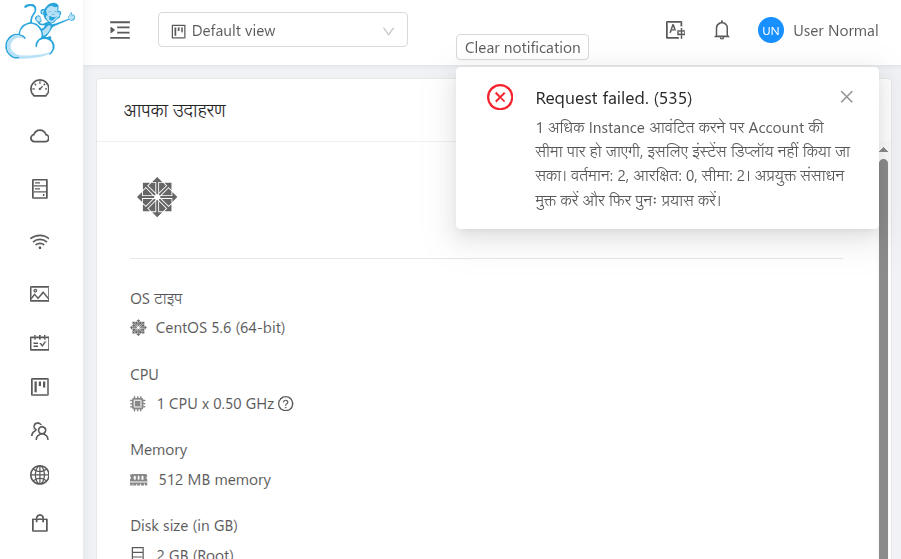
The account resource-limit error from the example above, localized in
the UI via a hi.json entry keyed on errortextkey.